11 Built-in Presets
Halves, thirds, quarters, center, and maximize, each with a customizable keyboard shortcut.
Read the guide: 11 Built-in PresetsA little more room to focus. For macOS & Windows.
Resize neighboring windows together. Undo changes or restore a saved layout.
Try Pro window management for free
Free until
Keep using Free after the offer ends.
Enjoy Pro free for 30 days
Your trial starts when you create an account. One free trial per account.
Keep using Free when your trial ends.
Resize adjacent windows at a detected shared edge. Enable Sticky Resize first. Read the guide: Sticky Resize
Interactive browser preview · Only the windows inside this demo change.
THE EVERYDAY ESSENTIALS
Halves, thirds, quarters and more.
Customize the actions you use most.
Keep each workflow’s settings separate.
Trade places without dragging twice.
Halves, thirds, quarters, center, and maximize, each with a customizable keyboard shortcut.
Read the guide: 11 Built-in PresetsDesign window zones with monitor-aware 12×12, 24×12, or 36×12 grid profiles, then apply them with a shortcut or drag.
Read the guide: Custom Layouts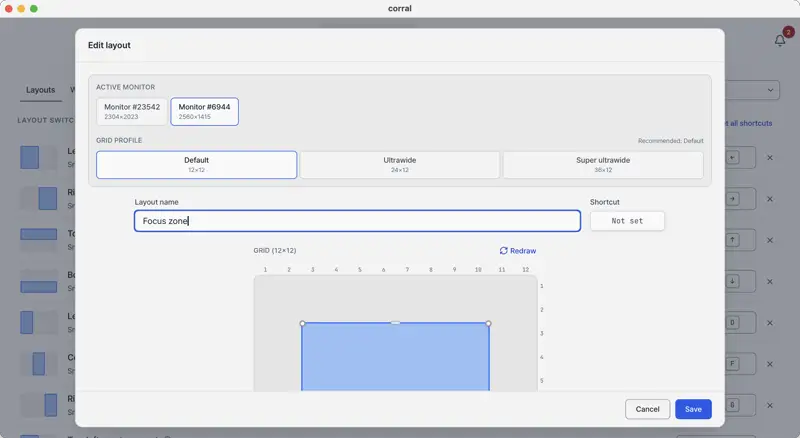
Drag a window to a screen edge or corner and Corral tiles it automatically with a live preview, even across mixed-DPI monitors.
Read the guide: Window SnapSee live resize ratios without losing focus on your current window while adjacent windows stay aligned.
Keep layouts, shortcuts, Window Snap, Sticky Resize, snapshots, and exclusions separate for each activity.
Read the guide: Window Management ProfilesReview product updates and actionable notices in one inbox without interrupting your current window.
Read the guide: Integrated NotificationsReport a problem or share an idea, then follow replies, status changes, comments, and votes inside Corral.
Read the guide: Feedback TrackingSIMPLE PRICING
Keep the essentials on Free. Get Pro by the year, every 3 months, or once for life.
No sign-in needed for beta window-management features. Cloud sync and other server-connected features still require sign-in.
Create an account and use Pro free for 30 days, no payment details needed. Accounts created during the beta get their 30 days from the day the beta ends. Afterward, you can keep using Free.
$0forever
$14.99per year · $1.25/month · tax included
Purchases open in
Purchases will be available from this time.
Use Pro window-management features without signing in during the beta. Cloud sync and other server-connected features still require sign-in. The Free plan remains available after the beta. Pro costs $14.99 a year, $4.99 every 3 months, or $39.99 once for life, tax included.
Keep using Free when your trial ends. Pro costs $14.99 a year, $4.99 every 3 months, or $39.99 once for life, tax included. Cancel a subscription anytime.

LESS REARRANGING. MORE DOING.
Download the macOS DMG from the official release page, or get Corral from the Microsoft Store on Windows.